Showing posts with label hardware. Show all posts

Tuesday, March 30, 2010

AMD launches 12-core server chips Opteron 6000


The chip core war continues, AMD Opteron 6000-series "Magny-Cours" with twelve core will be released in the first quarter of 2010. AMD’s twelve-core Opteron “Magny-Cours” will compete against Intel’s eight-core Xeon MP “Nehalem-EX”. The new chips have 119 percent better performance than AMD’s earlier versions. It is designed for Server class machines.

Friday, July 24, 2009

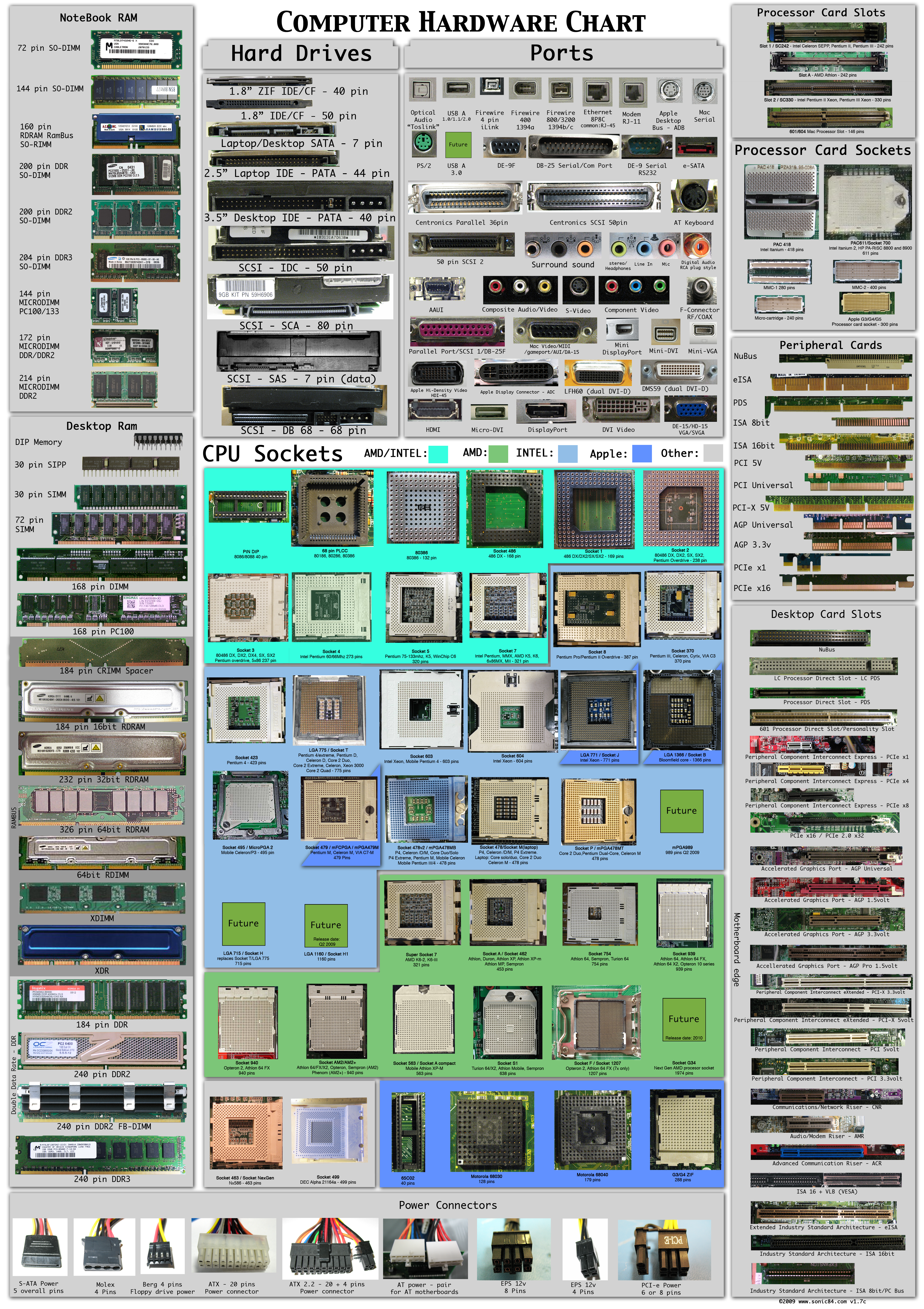
Collection of Hardware Connectors and Sockets

Very good effort from sonic84. See Large picture here
Picture includes most of all Hardware Parts, Connectors, Sockets, Modules etc... Click to enlarge
original site

Howto Find Maximum memory capacity of Your Computer


Before Upgrading your Computers Memory capacity, You have to check maximum memory capacity of your system supports.
see this also

How to check your maximum memory capacity

it is simple
$ sudo dmidecode | grep Maximum

output

Maximum Size: 32 KB
Maximum Size: 4096 KB
Maximum Size: 0 KB
Maximum Capacity: 8 GB

Sunday, December 14, 2008

Check Before Buying a Hardware for Ubuntu Machine

Hardware compatibility is not a very big problem in Linux now, but still there is some problems. Most of the devices are come with Windows Drivers. So you check the device for Ubuntu Hardware compatibility before buying it.

http://ubuntuhcl.org/ will give a comprehensive Ubuntu Hardware Database

Howto Solve Loss of sound after upgrade to Ubuntu 8.10

After the installation of ubuntu 8.10 I have loss the sound in my Intel G33 Motherboard.

See the steps to solve the problem

Download OSS Driver
( http://www.4front-tech.com/release/oss-linux-4.0-1016_i386.deb)

$ sudo dpkg -i oss-linux-4.0-1016_i386.deb

Reboot the system


Wednesday, December 3, 2008

Howto get your system specification in ubuntu

There is a simple way to find the Hardware specification of your computer.

open a terminal windows and type the following

$lshw this will give the full hardware details in an ugly text format

Now you can try the follwing

$lshw -html > abcd.html

open the abcd.html file in web browser (firefox)

Saturday, November 1, 2008

You can keep 19" Monitor in your Pocket !!! Foldable OLED Make it Possible


OLEDs become the star of tomorrow. Flexible and foldable OLEDs are Tested by leading manufactures. Researchers of European ROLLED project have developed a flexible OLED element that can be mass produced using roll-to-roll printing technology. The flexible OLED element can be used in product packaging, posters or on supermarket shelves to attract the attention of consumers and also for keeping your monitor in pocket.

Foldable OLEDs have substrates made of very flexible metallic foils or plastics. Foldable OLEDs are very lightweight and durable.
See more about Flexible OLED here
and more about Foldable OLED here

Wednesday, October 29, 2008

64GB Flash drive from Corsair-flash drives breaking barriers


Corsair Voyager is one of the most advanced and famous flash drives in market quite number of years with its durable, water resistance and drop tested design. Now announced their Corsair Flash Voyager family of USB drives with capacity 64GB. See More

Wednesday, August 27, 2008

Compare DDR2 and DDR3

Compare DDR2 and DDR3

Considering the ever growing need of speed and efficiency, understanding Double-Data-Rate (DDR) memory is important to system developers.

Characteristics
DDR memory's primary advantage is the ability to fetch data on both the rising and falling-edge of a clock cycle. DDR1, DDR2, DDR3 memories are powered up with 2.5, 1.8 and 1.5V supply voltage respectively. Temporization is another characteristic of of DDR memories, memory temporization is given in a series of numbers, such as 2-3-2-6-T1, 3-4-4-8 or 2-2-2-5 (CL-tRCD-tRP-tRAS-CMD) for DDR1. These numbers indicate the number of clock pulses that it takes to perform a certain operation- smaller the number faster the memory.
CL - Column Address Strobe, tRCD - Row Access Strobe to CAS delay

Type of DDR Memories

DDR1 with a maximum rated clock of 400MHz and a 64bit(8 bytes) data bus ( Now it is obsolete) .
DDR2 with a maximum rated clock of 800Mhz and a 64bit(8 bytes) data bus. DDR2 memory is physically incompatible ith previous generation of DDR memories.
DDR3 starts where DDR2 left off(800 MHz) and bring the speed up to 1.6 GHz. The 1.5V DDR3 voltage also save power( it will work in 1.36v also)

DDR2 Vs DDR3

DDR2 memories include 400Mhz, 533Mhz, 667Mhz and 800MHz versions, while DDR3 includes 800MHz, 1066Mhz, 1333MHz, and 1666Mhz versions.

Besides the enhanced bandwidth, DDR3 also uses less power than DDR2 by operating on 1.5V(16.3% reduction)

A newly introduced automatic calibration feature for the output data buffer enhances the ability to control the system timing during variations in voltage and temparature.

DDR3 devices introduce an interrupt reset for system flexibility.

Difference in the CL ( Column Address Strobe)

The controller in DDR2 memories works by preloading 4 data bits from the storage are(prefetch) while DD# works by loading 8 bits in advance.

For more details read ECN August 2008, Understanding RAM timings (article) www.hardwaresecrets.com/article/26/1 and powerelectronics.com/mag/power_ddr_memories_require/