Thursday, July 30, 2009

AutoScan Network :Network Monitoring and Management Tool for Linux / Windows / Mac


AutoScan-Network is a network discovering and managing Tool. No Special configuration is required to scan your network.

Main Features:
•Multithreaded Scan
•Automatic network discovery
•Realtime detection of any connected equipment
•Supervision of any equipment /service (router, server, firewall, smtp, http, pop)
•Automatic detection of known operatic system (brand and version)
•Intruders detection (in intruders detection mode, all new equipments blacklisted) •
•Telnet Client •
•Vnc Client

How to install autoscan-network in ubuntu / Debian
Download the package from Here
Unzip the tar.gz file in a folder
Official site here
then execute the .bin file
( installation is very simple just double click on files)

Rapache : Graphical Front end for Apache Webserver in Linux


Rapache is a utility used for remotely managing Apache webserver.
Rapache is a free software, developed with Python + GTK, usong this utility you can very easily create a virtual host, enabling / disabling modules and quickly review the logs etc.

For installing rapache in ubuntu / debian

open a terminal

$ sudo apt-get install rapache ( or use synaptic package manager)

see https://launchpad.net/rapache for more details

Wednesday, July 29, 2009

How to Share Files quickly in Ubuntu / Debian Linux

In the very first day of my python study, I wondered!!!
Some time we need to share files to other systems in our computer center quickly with out any tools in hand. If you have a python installation in your system, file sharing is very simple by implementing a little http server, using a single line command.

Suppose If you want to share the folder /home/shibu/ and my IP address is 192.168.0.4

open a terminal then type following
$ cd /home/shibu

$ python -m SimpleHTTPServer

Now your http server will start in port 8000
( You will get a message - Serving HTTP on 0.0.0.0 port 8000 ... )

Now you can open a browser in the remote machine and type the following in the address bar

http://192.168.0.4:8000

If you are a network administrator it is very useful, normal users can also use this trick.

you can test it locally by using
http://127.0.0.1:8000

Smile : Video Slide Show Creator For Ubuntu / Debian Linux

Smile is a simple tool for creating Video Slide show in Linux.

First you have to install smile-data using gdebi package manager
Download Smile-data From here
(9.6 MB)

After that Install Smile
Download Smile from here
(1.1 MB)

Tuesday, July 28, 2009

gshutdown : Graphical Shutdown Utility

gshutdown is a Graphical Shutdown Utility, you can set the shutdown /restart time graphically. Beginners can easily schedule shutdown time using this utility.

$ sudo apt-get install gshutdown ( or use synaptic package manager)

Howto Change Wallpapper Automaticaly in ubuntu Linux : Drapes

Desktop Drapes will change your wallpaper randomly. It will select wallpaper from a list, or you can point it to a directory.

$ sudo apt-get install drapes

Monday, July 27, 2009

Virtual Makeup Software for Ubuntu / Debian Linux : jkiwi


jkiwi is a very unique software ever seen in linux. It won the national open source contest in Portugal. It can be used for hairstyling, concealer paint, eye shadows, blush, contact lenses for eye colors, change lip colors. Yes you can share it with your friend after loading it in your laptop.

Kiwi works best with images in .jpg or .png format and you should use a vertical image in one of the resolutions (480x640, 600x800, 768x1024). Larger images is not recomended due to memory size and overall application speed.

How to install jkiwi in ubuntu / debian
Download the .deb file from here (32 MB in size)
now
$ sudo dpkg -i jkiwi_0.9.5_ubuntu.deb
official site
It requires jre 5 or greater to run.

Ohh My God !! Debian / Ubuntu Package for S-e-x/ p-o-r-n Download : Gnaughty

FOSS Community knows what stuff people looking for!!!
I Cannot Believe, But it is true, because I have Tested this package in my ubuntu box and removed it . It is looking for an entry in Gnome. It is a sourceforge project !!! Click to enlarge the picture (my screen shot) for understanding How much serious it is!!
See the project description
Fast and Easy P-o-r-n Downloader

Gnaughty is a program to automatically download a-d-u-l-t s-e-x content, i.e. p-o-r-n movies and pictures, from a known Internet porn directory.

Providing a friendly interface, users who feel like having some p-o-r-n can have it served fastly and directly to their desktop.

Beware Network Administrators

IT WILL EAT YOUR BANDWIDTH !!!!!!

http://gnaughty.sourceforge.net/


HowTo find Duplicate files in Ubuntu Linux : Fslint

Finding Duplicate files in linux is a difficult job. FSlint is a very good utility for find and clean duplicate file in linux. FSlint can use for one click removal of duplicate files, empty folders, temporary files, check the packages installed, incorrect connections etc..

For Installing FSlint in Ubuntu
$ sudo apt-get install fslint ( it is version 2.26)

Install latest version
wget http://www.pixelbeat.org/fslint/fslint_2.40-1_all.deb
sudo dpkg -i fslint_2.40-1_all.deb

For Fedora and Readhat
wget http://www.pixelbeat.org/fslint/fslint-2.40-2.noarch.rpm
sudo rpm -Uvh fslint-2.40-2.noarch.rpm

Friday, July 24, 2009

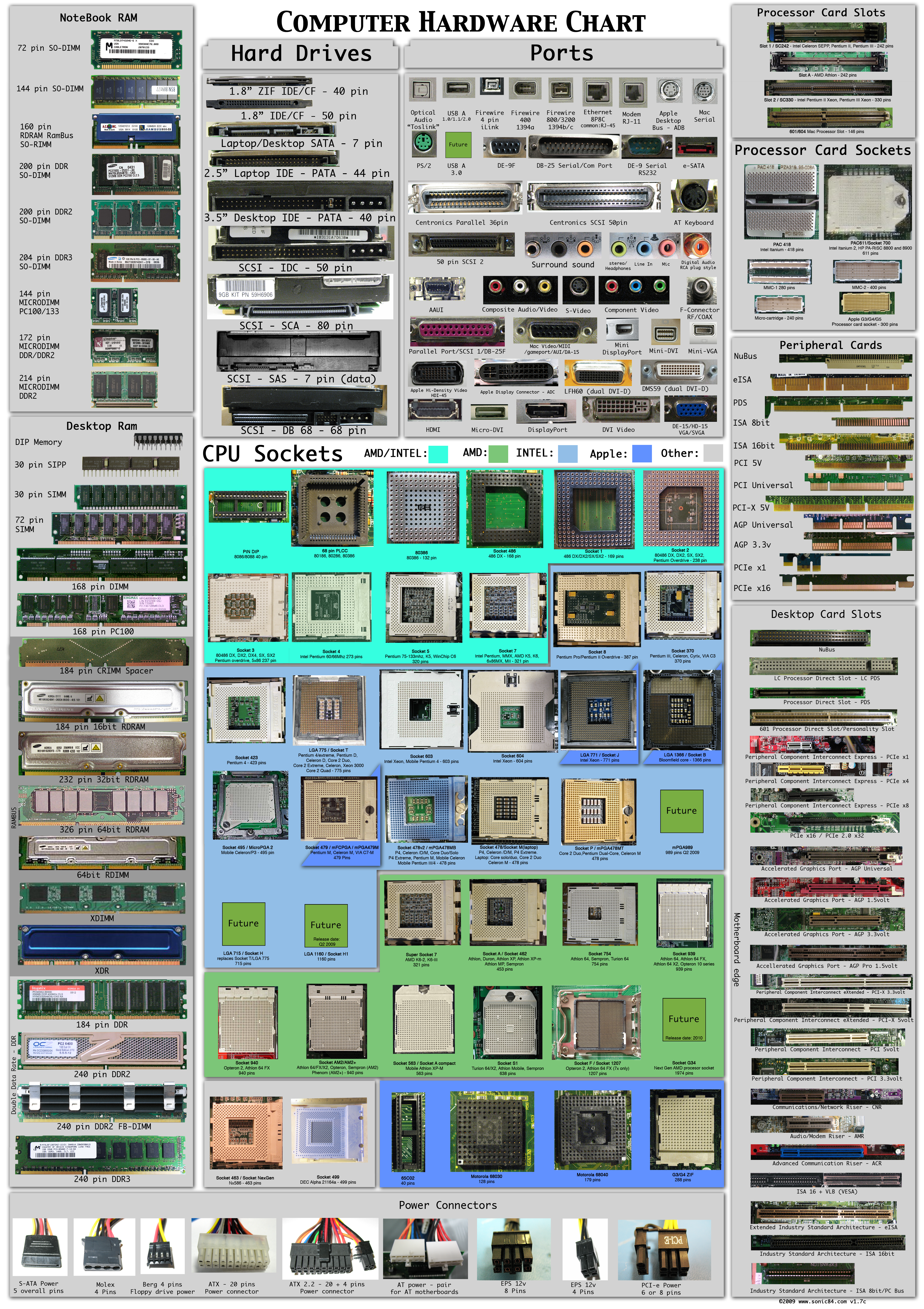
Collection of Hardware Connectors and Sockets

Very good effort from sonic84. See Large picture here
Picture includes most of all Hardware Parts, Connectors, Sockets, Modules etc... Click to enlarge
original site